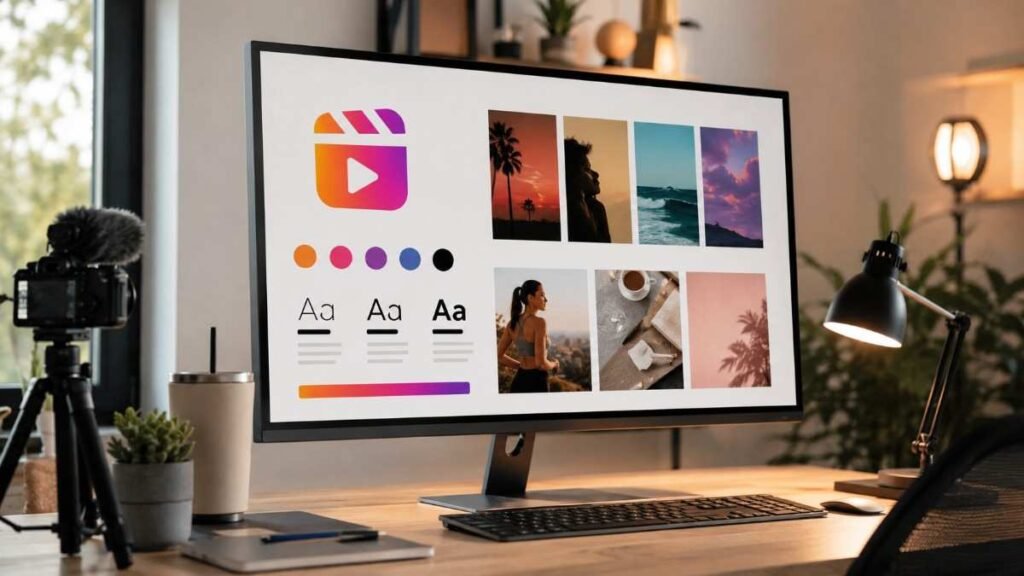
Scrolling through Instagram can feel repetitive when every Reel uses the same trends, edits, and transitions. After testing different content styles and studying high-performing creators, one thing became obvious. Branding visuals for reels are what truly make content memorable. Strong visual branding helps your audience recognize your content instantly while making your Reels look polished, professional, and engaging from the very first second.
Key Takeaways
- Branding visuals for reels improve recognition and engagement
- Consistent fonts, colors, and layouts build brand identity
- Motion graphics and visual storytelling increase retention
- Reel covers help create a polished Instagram profile
- Reusable templates save editing time and maintain consistency
Why Branding Visuals for Reels Matter
Branded Reels also improve audience recall. When viewers repeatedly see familiar colors, typography, editing styles, and layouts, they begin associating those visuals with your brand identity. This creates stronger long-term engagement across Instagram and other social media platforms.
Visual Consistency Builds Trust
Using the same color palette, text style, motion graphics, and thumbnail structure across Reels creates a recognizable experience for viewers. This consistency helps audiences instantly connect your content with your brand.
Visual consistency also improves perceived quality. Even simple videos look more polished when branding visuals feel organized and cohesive across every Reel.
Reels Need Scroll-Stopping Design
Strong branding visuals for reels help stop the scroll through bold typography, clean layouts, engaging motion design, and readable captions. Viewers decide within seconds whether content feels worth watching.
Good visual storytelling also increases retention. When movement, framing, and graphics guide attention naturally, audiences stay engaged longer without feeling overwhelmed by excessive editing.
Essential Branding Visuals for Reels
Building a recognizable Reel identity starts with a few core visual elements.
Brand Colors and Aesthetic

Choosing two to four consistent brand colors helps create a recognizable visual style across Reels, stories, thumbnails, and carousel posts. Consistent color usage strengthens social media branding and improves content cohesion.
A clean aesthetic also makes content easier to consume. Balanced contrast, minimal clutter, and intentional spacing help Reels look modern and visually appealing on mobile screens.
Typography and Text Overlays
Typography for brand identity plays a huge role in Reel branding as well.
Educational creators often use clean sans-serif fonts for readability, while lifestyle brands may prefer bold display fonts for personality. Consistent font pairings make Reels feel connected even when the content topics change.
Readable captions are equally important. Since many viewers watch Reels without sound, strong text overlays improve accessibility and retention at the same time.
Motion Graphics and Editing Style
Simple transitions, animated captions, and subtle movement graphics create a polished viewing experience. Consistent editing styles also help audiences recognize your content style instantly.
The best branded Reels use movement intentionally. Instead of adding random effects, strong creators use pacing and transitions to support the story visually.
How To Create Branding Visuals for Reels
Creating branding visuals for reels becomes easier once you build a repeatable visual system.
Start With a Reel Style Guide

Choose your fonts, color palette, thumbnail style, transitions, and text layouts before creating content. This helps maintain consistency across all Reels while reducing editing decisions later.
A simple Reel branding kit can dramatically improve workflow efficiency. It also ensures your content looks cohesive across Instagram, TikTok, and YouTube Shorts.
Design Branded Reel Covers
A clean branded cover helps your Instagram profile grid look professional and visually balanced. Consistent spacing, title placement, and color usage make profiles look more trustworthy and organized.
Branded covers also improve click-through rates because viewers immediately understand the type of content they can expect from your page.
Use Reusable Templates
Tools like Canva, Figma, and Adobe Express make it easy to create reusable layouts for hooks, captions, lower thirds, and call-to-actions. This saves time without sacrificing visual quality.
Reusable templates also strengthen visual identity because every Reel follows a recognizable structure that audiences begin associating with your brand.
Common Mistakes in Branding Visuals for Reels
Even strong content can lose impact because of inconsistent branding.
Following Every Trend
Creators who constantly change editing styles, colors, or aesthetics struggle to build recognizable brand design. Adapting trends while maintaining consistent visuals works much better for audience retention.
Strong brands evolve gradually instead of changing their entire visual identity every week based on viral trends.
Overloading Visual Elements

Using excessive fonts, colors, transitions, and animations creates visual clutter that reduces professionalism. Simpler visual systems usually perform better because they feel cleaner and easier to follow. Minimal editing also keeps attention focused on the message rather than unnecessary effects.
Ignoring Mobile Optimization
Tiny text, poor spacing, and overcrowded layouts reduce readability and engagement. Always preview Reels on mobile before posting to ensure visuals look clear and balanced on smaller screens.
Best Tools for Branding Visuals for Reels
The right tools can improve both visual quality and workflow efficiency.
Canva and Adobe Express
Creators can quickly design branded thumbnails, text overlays, animated captions, and social media templates without advanced editing knowledge. They also help maintain visual consistency across multiple content formats. Pre-built templates save time while still allowing enough customization for unique branding.
Figma for Visual Systems
Figma works especially well for building long-term branding systems. It helps organize typography scales, spacing systems, color palettes, and reusable design components. This makes it easier to maintain consistency across all visual content.
Many professional creators and agencies use Figma because it supports scalable visual branding workflows.
CapCut and Premiere Pro
These editing tools improve motion branding significantly. Advanced transitions, cinematic pacing, animated text, and branded motion graphics are easier to create with professional editing software. Strong editing helps Reels feel polished without overcomplicating the visuals.
Frequently Asked Questions
1. What are branding visuals for reels?
Branding visuals for reels include colors, fonts, graphics, transitions, layouts, and editing styles that create a consistent and recognizable visual identity.
2. Why are branding visuals for reels important?
They improve audience recognition, engagement, trust, and content consistency while helping creators stand out on Instagram.
3. Which tools are best for branding visuals for reels?
Canva, Figma, CapCut, Adobe Express, and Premiere Pro are popular tools for creating branded Reel content.
4. How often should Reel branding change?
Reel branding should evolve gradually while maintaining core visual elements like typography, colors, and editing style for consistency.
Make Your Reels Impossible To Ignore
Branding visuals for reels are what separate memorable creators from forgettable content. Consistent colors, typography, motion design, and visual storytelling help audiences instantly recognize your videos while improving trust and engagement over time.
Instead of chasing every trend, focus on building a strong visual identity that reflects your brand personality. The more recognizable your Reels become, the easier it becomes to grow a loyal audience that remembers your content long after they stop scrolling.